 ftpGrid menu
Cloud FTP vs S3: which is better for file transfers?
Published 2026-04-28 04:46:01.773427 by Carsten Blum
When it comes to storing and transferring files, two common approaches stand out: cloud FTP and object storage like S3.
Both are powerful — but they solve very different problems.
In this guide, we’ll compare cloud FTP and S3, when to use each, and how to combine them for the best results.
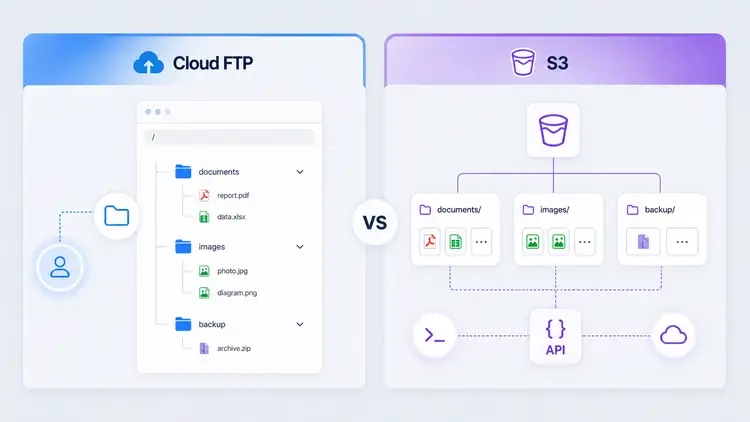
What is cloud FTP?
Cloud FTP is a managed file transfer solution that works like traditional FTP — but without the need to run your own server.
It provides:
Simple file access via FTP/SFTP/FTPS
Managed infrastructure
Scalable storage
Easy user management
If you're new to the concept, start here:
What is S3?
Amazon S3 is an object storage service designed for developers and large-scale applications.
Instead of folders and files, S3 uses:
Buckets
Objects
APIs
It’s highly scalable and extremely powerful — but also more complex to work with.
Key differences: cloud FTP vs S3
1. Ease of use
Cloud FTP
Familiar file structure
Works with standard FTP clients
Easy for non-developers
S3
Requires API usage or special tools
Less intuitive for manual file handling
If usability matters, a cloud FTP service is often the better choice.
2. Setup and integration
Cloud FTP
Quick to set up
Works with existing systems
Minimal configuration
You can get started quickly with a cloud FTP setup.
S3
Requires credentials, policies, and configuration
Often needs SDKs or third-party tools
3. File access and workflows
Cloud FTP
Direct file access
Ideal for uploads, downloads, and scheduled transfers
Works out of the box with scripts and tools
Supports secure protocols like:
S3
API-driven access
Better for application storage and data pipelines
4. Performance and scaling
Both solutions scale — but in different ways.
Cloud FTP
Handles file transfers and concurrent users
Optimized for real-world transfer workflows
Backed by scalable cloud FTP storage
S3
Massive scalability
Designed for large-scale data storage and retrieval
5. Maintenance and operations
Cloud FTP
Fully managed
No servers to maintain
Minimal operational overhead
A cloud FTP hosting platform removes infrastructure complexity.
S3
No servers, but more configuration
Requires knowledge of IAM, policies, and permissions
When to use cloud FTP
Cloud FTP is ideal if you need:
Simple file transfers
User-friendly access
Integration with existing FTP workflows
Scheduled uploads and backups
If you're working with backups, this guide may help:
→ https://ftpgrid.com/tutorials/cloud-ftp-for-backups/
When to use S3
S3 is a strong choice if you need:
Application-level storage
Massive scalability
API-driven workflows
Integration with AWS services
The best of both worlds: cloud FTP + S3 sync
In many real-world scenarios, the best solution is not choosing one — but combining both.
You can use cloud FTP for:
Simple file uploads
User access
External integrations
And then sync files to S3 for:
Long-term storage
Data processing
Integration with AWS services
With cloud sync, you get:
Automatic file transfer from FTP to S3
No manual uploads
Seamless integration between systems
Learn more: https://ftpgrid.com/sync-ftp-to-aws-s3/
Avoiding common mistakes
When comparing cloud FTP and S3, teams often:
Choose S3 for simple file transfers (too complex)
Stick with FTP servers that don’t scale
Ignore integration possibilities
If you're currently running your own setup, this article explains typical issues:
→ https://ftpgrid.com/tutorials/self-hosted-ftp-scaling-problems/
And if you're considering a migration:
→ https://ftpgrid.com/tutorials/move-ftp-to-cloud/
Conclusion
Cloud FTP and S3 are not direct competitors — they serve different purposes.
Cloud FTP = simple, accessible file transfers
S3 = scalable, developer-focused storage
For many teams, the best solution is to combine both.
Explore cloud FTP to simplify file transfers and integrate seamlessly with modern cloud storage.