 ftpGrid menu
Cloud FTP for backups: simple, reliable and scalable storage
Published 2026-04-22 04:02:40.852543 by Carsten Blum
Backing up files should be simple. But in reality, many backup setups become complex, fragile, and hard to maintain over time.
Cloud FTP offers a straightforward alternative: reliable file transfers, predictable storage, and minimal operational overhead.
In this guide, we’ll look at how cloud FTP works for backups, when it makes sense, and why many teams are moving away from self-hosted solutions.
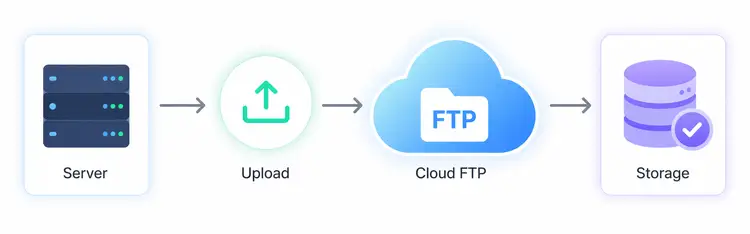
Why FTP is still used for backups
Despite newer storage technologies, FTP (and especially SFTP/FTPS) remains widely used for backups.
Why?
Works with almost every system
Easy to automate
No vendor lock-in
Simple file-based structure
For many use cases, especially scheduled backups, FTP is still one of the most practical options available.
If you're exploring modern setups, a cloud FTP solution combines this simplicity with managed infrastructure.
The problem with traditional backup setups
Self-hosted FTP servers often work well in the beginning. But over time, problems start to appear:
Disk space runs out
Backups silently fail
No redundancy
Manual maintenance and updates
Security risks if not patched
This is where many setups break down — especially as data grows.
A managed FTP server in the cloud removes these risks entirely.
For a deeper comparison of infrastructure approaches, see:
this cloud FTP vs self-hosted breakdown.
How cloud FTP simplifies backups
Cloud FTP removes most of the operational burden.
Instead of managing servers, you get a managed environment designed for file transfers and storage.
Key advantages:
1. No infrastructure to maintain
No servers, no patching, no monitoring disks. Just use a cloud FTP service that works out of the box.
2. Reliable storage
Backups are stored in redundant environments using cloud FTP storage, reducing the risk of data loss.
3. Easy automation
You can schedule uploads using:
Cron jobs
Backup software
Scripts or APIs
Getting started is fast with a simple cloud FTP setup guide.
4. Scales with your data
As your backups grow, storage scales with it — no need to migrate servers or reconfigure infrastructure.
Common backup use cases for cloud FTP
Cloud FTP is especially useful in these scenarios:
Website and database backups
Automated daily backups uploaded securely via SFTP.
Application file backups
Logs, exports, or generated files stored externally using a cloud FTP hosting platform.
Offsite backups
Critical for disaster recovery — backups stored away from your primary infrastructure.
Scheduled data exports
ERP, finance, or analytics systems exporting files regularly via FTPS.
Cloud FTP vs other backup solutions
Compared to object storage (like S3), cloud FTP is often:
Easier to set up
Faster to integrate with existing systems
More accessible for non-developers
Compared to self-hosted FTP:
More reliable
More secure
Less maintenance
A centralized cloud FTP platform combines ease of use with scalability.
Adding automation with APIs and webhooks
Modern cloud FTP platforms don’t just support file transfers — they also support automation.
For example:
Trigger workflows after uploads
Monitor activity via APIs
Integrate with other systems
This makes it possible to build simple but powerful backup pipelines without complex infrastructure.
When cloud FTP is the right choice
Cloud FTP is a strong fit if:
You want simple, reliable backups
You don’t want to manage infrastructure
You already use FTP/SFTP
You need predictable file-based storage
If your setup is becoming harder to maintain, it’s often a sign it’s time to move to a managed cloud FTP solution.
Conclusion
Backups don’t need to be complicated.
Cloud FTP offers a simple, scalable way to store and transfer backup files — without the overhead of running your own servers.
For many teams, it’s the easiest way to get reliable backups in place quickly.
Explore cloud FTP storage and set up your backup workflow in minutes.