 ftpGrid menu
Building file integrations with FTP, APIs and webhooks
Published 2026-05-01 05:23:31.810521 by Carsten Blum
File-based integrations are everywhere.
ERP systems exporting data. Cameras uploading footage. Legacy systems pushing CSV files. Partners exchanging documents.
And despite all the talk about APIs and real-time systems, a surprising amount of real-world infrastructure still runs on one simple thing:
File transfers.
The problem is not the file transfer itself — it’s everything around it.
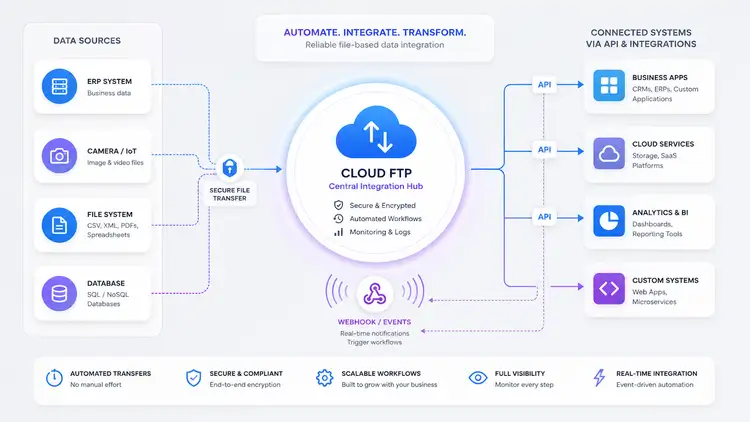
The missing layer in file-based workflows
Traditional FTP setups are great at one thing:
Moving files from A to B
But modern systems need more:
Events when something happens
Programmatic access to data
Integration with other systems
Visibility and control
That’s where most setups fall apart.
If you’ve ever tried building on top of a self-hosted FTP server, you’ve probably had to:
Parse logs manually
Poll directories for changes
Build custom scripts
Maintain fragile integrations
→ https://ftpgrid.com/tutorials/self-hosted-ftp-scaling-problems/
From file transfer to event-driven workflows
What if file transfers weren’t just passive?
What if:
A file upload triggered an event
That event could call another system
And the data could be accessed via API
That’s the shift from “FTP server” → “integration layer”.
With a cloud FTP platform and scalable cloud FTP storage, you can start treating file transfers as part of a workflow — not just storage.
Introducing webhooks and the upcoming REST API
We recently introduced webhooks, and we’re currently working on a REST API (released end May 2026).
Together, they enable something powerful:
FTP handles ingestion
Webhooks trigger events
API provides structured access
This combination makes it possible to build modern, event-driven integrations on top of file transfers using a fully managed cloud FTP service.
Real-world example 1: ERP to customer system
Imagine you need to share data from your ERP system with an external partner — for example an auditor, customer, or BI tool like Tableau. You don’t want to give them direct access to your ERP, but you still need a secure and automated way to deliver data they can consume. A file-based flow with events and API access solves this cleanly without tight system coupling.
A classic scenario:
ERP exports a file (orders, invoices, etc.)
File is uploaded to cloud FTP
A webhook is triggered
Customer system receives the event
Data is fetched via API
ERP → Cloud FTP → Webhook → Customer system → API fetch
This removes the need for:
Manual polling
Custom FTP parsing logic
Complex integration layers
Real-world example 2: Video surveillance alerts
Lets say you’re running a surveillance system where cameras continuously upload footage, but you only care when something actually happens. You don’t want someone watching feeds all day — you need instant alerts when motion is detected. By reacting to uploads in real-time, you can turn passive storage into an active alerting system.
Another real-world use case:
Camera uploads a video file
File lands in cloud FTP
Webhook triggers instantly
Notification system sends SMS/email
Camera → Cloud FTP → Webhook → Notification system
Result:
Real-time alerts
No need for constant monitoring
Simple integration with existing systems
Secure transfers can be handled via SFTP or FTPS.
Real-world example 3: Automated backups with validation
A very real use case could be, that you rely on daily backups, but you’ve been burned before by silent failures. Files are uploaded, but no one checks if they’re complete, valid, or even usable. By adding events and validation on top of file uploads, you can turn backups into something observable and trustworthy.
Backups are often passive.
But they don’t have to be.
System uploads backup file
Webhook triggers validation service
API used to verify file presence and size
Alert if something is wrong
System → Cloud FTP → Webhook → Validation → API check
This adds reliability to something that’s usually blind.
→ https://ftpgrid.com/tutorials/cloud-ftp-for-backups/
Real-world example 4: Data pipelines with S3 sync
Imagine you receive data from multiple external systems, but your analytics or processing pipeline runs in the cloud — for example on AWS. You need a simple ingestion point for incoming files, but also a scalable backend for storage and processing. Combining FTP ingestion with automated sync to S3 gives you both simplicity and scalability without complex ingestion pipelines.
In more advanced setups:
Files uploaded via FTP
Synced automatically to S3
Webhook triggers processing pipeline
Downstream systems consume data
FTP → Cloud FTP → S3 sync → Webhook → Processing
This combines:
Simplicity (FTP)
Scalability (S3)
Automation (webhooks + API)
If you want to implement this pattern, you can use built-in sync to connect FTP directly with S3:
→ https://ftpgrid.com/sync-ftp-to-aws-s3/
Why this approach works
This model works because it separates concerns:
FTP = ingestion
Webhooks = events
API = access
Instead of forcing everything into one system, each part does what it’s best at.
Where traditional setups fall short
Without this model, teams often end up with:
Cron jobs polling directories
Scripts parsing file systems
Hardcoded integrations
Limited observability
This leads to fragile systems that are hard to maintain and scale.
If you're still running your own setup, this guide covers the typical issues:
→ https://ftpgrid.com/tutorials/self-hosted-ftp-scaling-problems/
What’s coming next
With the upcoming REST API, the goal is simple:
Make file-based workflows programmable.
List and retrieve files
Trigger actions
Build integrations
Connect systems cleanly
Combined with webhooks, this opens up a new way of working with FTP-based systems.
Final thoughts
File-based integrations aren’t going away.
But they are evolving.
By combining:
Cloud FTP
Webhooks
APIs
…you can turn simple file transfers into powerful, event-driven workflows.
Explore cloud FTP to see how modern file integrations can be built.