 ftpGrid menu
Your FTP server. Without the server maintenance.
Managed FTP Hosting for Business
Get a ready-to-use cloud FTP server without installing server software, maintaining infrastructure or renewing TLS certificates. Connect your existing applications, devices and business partners using FTP, FTPS, SFTP or SCP.
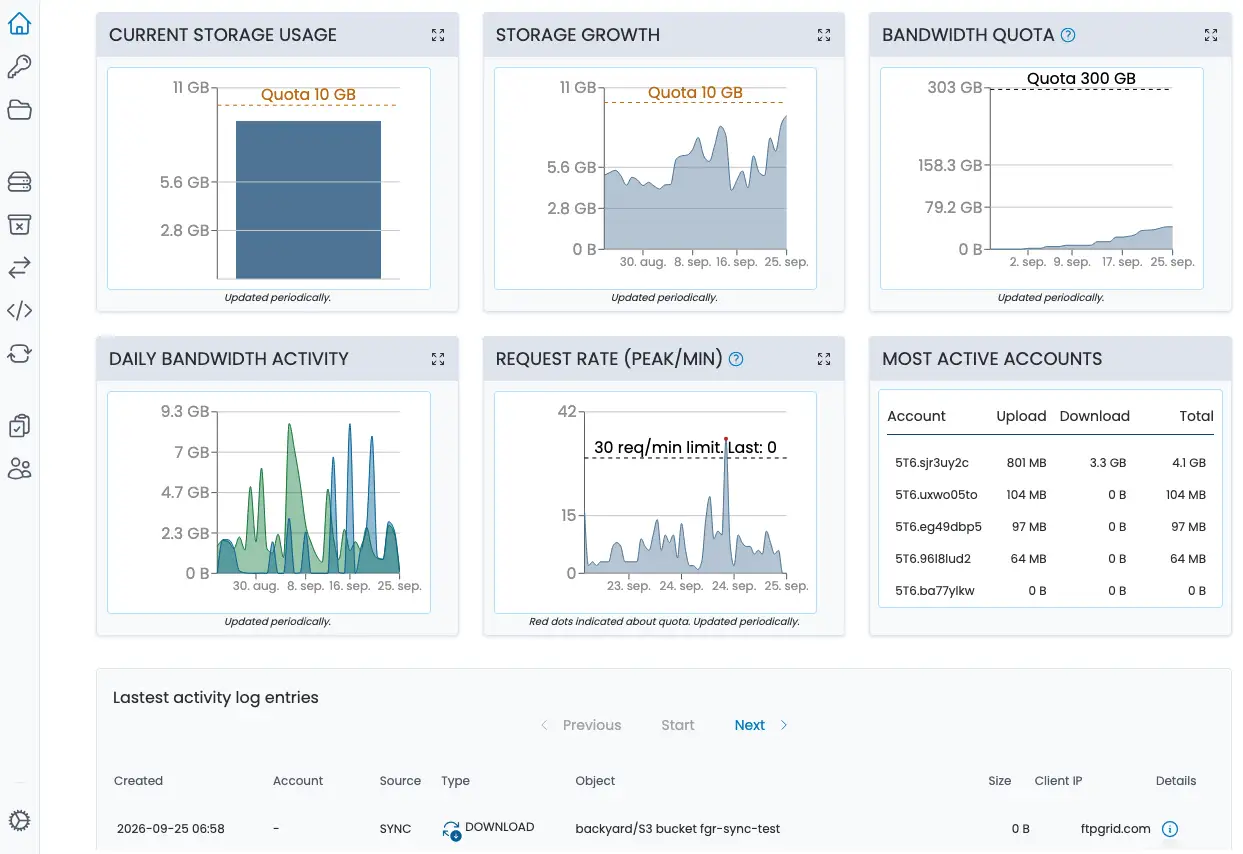
Manage file access through a web dashboard, exchange files with customers and automate transfers using cloud sync, REST API access and webhooks.
Hosted in the EU. Paid plans start at €19 per month.
What you get with ftpGrid FTP hosting
Fully managed FTP server
No server maintenance
ftpGrid handles infrastructure, software updates, monitoring and TLS certificates so your team can focus on file transfers.
FTP, FTPS, SFTP and SCP
Keep your existing integrations
Connect legacy FTP applications and modern encrypted file transfer clients to the same cloud storage platform.
Access control and encryption
Manage access to your files
Create individual accounts, configure permissions and use IP restrictions. FTPS and SFTP encrypt transfers, and stored files are protected with AES-256 encryption.
Storage that grows with your business
Predictable subscription pricing
Choose a plan based on storage, bandwidth and feature requirements, and upgrade as your business grows.
REST API and webhooks
Automate file processing
Perform file operations programmatically and notify external systems when files are uploaded, renamed or deleted.
Cloud sync and file exchange
Connect people and systems
Synchronize files with supported cloud storage providers or receive files from customers through browser-based upload links.
A managed FTP hosting service built for business
What is managed FTP hosting?
Managed FTP hosting provides a hosted file transfer endpoint and storage without requiring you to operate the underlying server. Instead of installing an FTP daemon on a virtual machine, you create accounts, configure access and connect your existing clients. ftpGrid manages the server infrastructure, software updates, monitoring and TLS certificates.
Unlike traditional website hosting with FTP access for publishing website files, ftpGrid is designed around business file exchange, cloud storage and application integrations.
FTP, FTPS or SFTP: which protocol should you use?
Not every application or device supports the same file transfer protocol. ftpGrid supports FTP, FTPS, SFTP and SCP, allowing you to retain compatible existing workflows while choosing encrypted connections wherever possible.
| Protocol | Encryption in transit | Typical use |
|---|---|---|
| FTP | None | Legacy applications and devices |
| FTPS | TLS | Encrypted FTP-compatible workflows |
| SFTP | SSH | Secure business transfers and automation |
| SCP | SSH | Compatible SSH-based file copy tools |
Standard FTP does not encrypt credentials or file contents. Use FTPS or SFTP whenever your client supports it. If your requirements are specifically SSH-based, explore our managed SFTP server.
Replace your self-hosted FTP server
Running an FTP server yourself involves more than installing software. You also need to manage storage, network configuration, security updates, TLS certificates and monitoring. With managed hosting, these infrastructure tasks are handled by ftpGrid, while you retain control over your accounts and file workflows.
To migrate, transfer your existing files, recreate the required user accounts and permissions, then update connection details in your clients and applications. Test your integrations before retiring the old server.
Manage access to your business files
Create separate file transfer accounts for customers, suppliers and automated systems. Configure account permissions and use supported IP restrictions to limit access to approved addresses or networks. Stored files are protected with AES-256 encryption at rest.
ftpGrid hosts data in the EU. Businesses evaluating their data protection requirements can review our data processing agreement.
Automate FTP transfers and connect cloud storage
Continue using existing FTP-compatible scripts and scheduled jobs, or integrate file operations through the REST API. Webhooks can notify your applications about uploaded, renamed and deleted files, enabling event-driven processing.
Managed cloud sync supports Amazon S3, Azure Blob Storage and S3-compatible services. Receive files from existing applications and synchronize them to cloud storage for further processing. Browser-based upload links also let customers submit files without installing an FTP client.
Advanced features and account limits depend on the selected subscription plan.
How much does FTP hosting cost?
Paid ftpGrid plans start at €19 per month for 10 GB of storage. The Professional plan provides 50 GB for €49 per month. Larger plans are available for businesses with greater storage and integration requirements.
Compare storage, bandwidth, account limits and included functionality on our FTP hosting pricing page. When comparing with a self-hosted server, consider the cost of infrastructure and ongoing administration as well as storage.
How to get started with your hosted FTP server
- Create your ftpGrid account.
- Create a file transfer account and configure its permissions.
- Choose a supported protocol and use the connection details from your dashboard.
- Connect your FTP client, device or application and test a file transfer.
Use our FileZilla setup guide to get started, or troubleshoot connectivity with the FTP connection test.
Explore ftpGrid hosting and storage options
Trusted by production companies, agencies and growing businesses worldwide
FTP hosting for everyday business workflows
Customer and supplier file exchange
Give business partners their own file transfer accounts and exchange documents, reports and operational files.
Automated exports and imports
Connect scheduled jobs, ERP systems and applications that already support FTP or FTPS.
Replacing legacy FTP servers
Move existing files and workflows to managed hosting without maintaining your own FTP server software.
Device and equipment uploads
Receive files from industrial equipment, cameras and other devices with compatible FTP clients.
Media and production workflows
Collect and distribute media assets through standard file transfer clients or browser-based upload links.
Remote backup transfers
Send backup files and database exports to hosted storage using compatible backup tools.
Frequently asked questions
Do I need to install FTP server software?
No. ftpGrid operates the underlying FTP infrastructure. Create your account and connect using a compatible client or application.
Can I use traditional FTP as well as encrypted protocols?
Yes. ftpGrid supports FTP, FTPS, SFTP and SCP. We recommend FTPS or SFTP whenever possible because standard FTP does not encrypt traffic.
How much does managed FTP hosting cost?
Paid plans start at €19 per month for 10 GB of storage. See the pricing page for bandwidth, account limits and available features.
Can I create separate FTP accounts for customers?
Yes. You can create individual file transfer accounts and configure their access permissions, subject to your plan limits.
Can I restrict access by IP address?
Yes. ftpGrid supports IP restrictions for supported file transfer accounts, using individual IP addresses or CIDR networks.
Can I use FileZilla with ftpGrid?
Yes. FileZilla supports FTP, FTPS and SFTP. Use the connection details provided in your ftpGrid dashboard.
Can I move files from an existing FTP server?
Yes. Transfer your files, recreate the required accounts and permissions, and update the connection settings in your applications.
Can I automate file transfers?
Yes. Use compatible clients, scripts and applications. REST API access, webhooks and managed cloud sync offer additional automation options on supported plans.
Where is my data hosted?
ftpGrid hosts data in the EU. Review our data processing agreement for further information.