 ftpGrid menu
Cloud Storage With Webhooks: Trigger Your Application When Files Arrive
Published 2026-10-16 04:50:22.233074 by Carsten Blum
A file arriving in cloud storage is often not the end of a business process. It is the beginning of one. A supplier uploads an order file. A customer submits a document. An ERP exports a report. A partner delivers a CSV file through SFTP. Your application now needs to do something with it. The traditional solution is polling: periodically connect to the storage location, list the files and check whether anything has changed. That works, and for some integrations it remains perfectly reasonable. But when the application needs to react quickly to new files, there is a simpler model:
File arrives → Cloud Storage → Webhook → Your Application
With ftpGrid, files can arrive through REST API, FTP or SFTP while webhooks notify your application about file events. That creates a useful bridge between traditional business file transfer and modern event-driven applications.
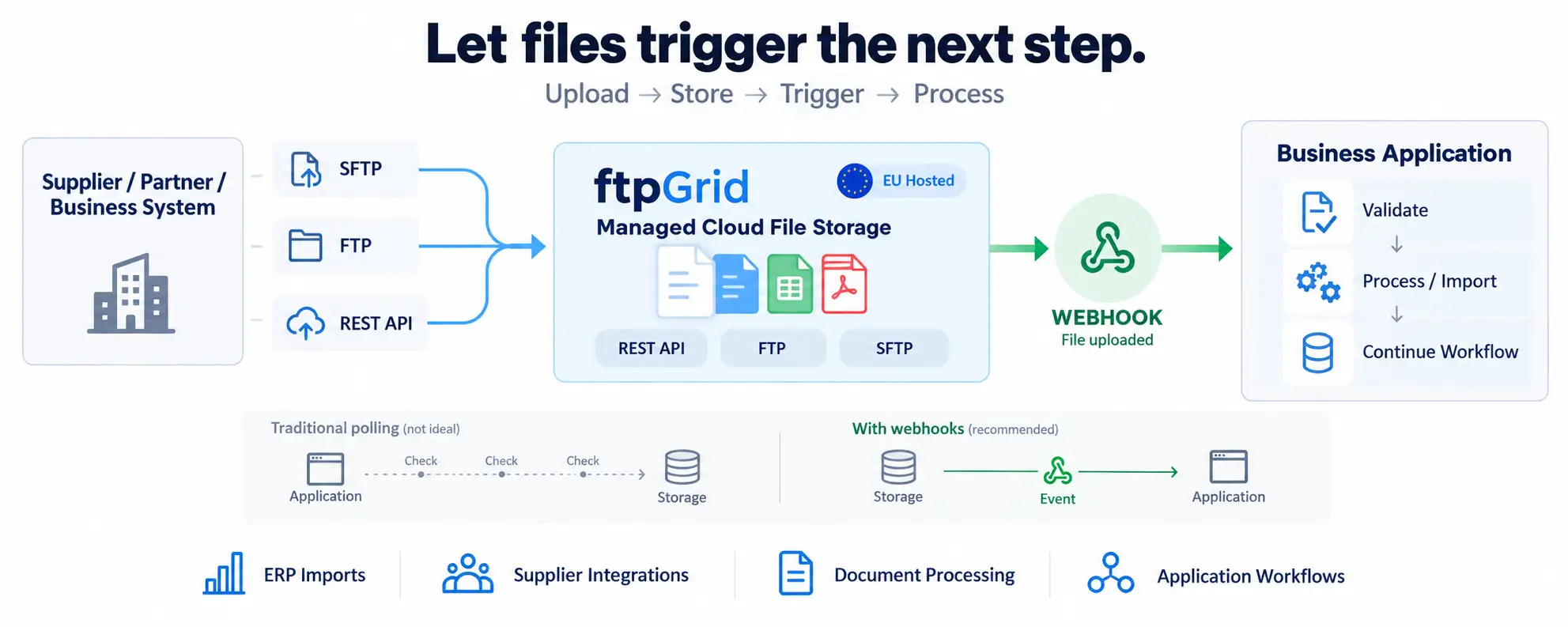 View larger infographic (AI generated image)
From file transfer to business workflow
Consider a typical supplier integration. A supplier has an established process that uploads a CSV file every morning using SFTP:
Supplier
 │
 │ SFTP
 ▼
Cloud Storage
The supplier considers its job complete when the file has been transferred.
But your business process has only just started.
The file might need to be:
Validated
Imported into an ERP
Processed by an application
Converted into another format
Added to a database
Moved through an approval workflow
Used to trigger another integration
The question is:
How does your application know that the file has arrived? One option is to keep asking the storage platform. Another is to let the storage platform tell you.
With a webhook, the architecture becomes:
Supplier
 │
 │ SFTP
 ▼
 ftpGrid Storage
 │
 │
 Webhook
 ▼
 Your Application
 │
 ▼
 Business Process
The file transfer becomes an event that can trigger the next step automatically.
Polling works — but webhooks can simplify the integration
Polling usually looks something like this:
Application
 │
 ├── List files
 │
 ├── Wait
 │
 ├── List files
 │
 ├── Wait
 │
 └── List files again
Your application needs a schedule, state management and logic for determining which files have already been processed.
For low-volume or batch-oriented integrations, this may be completely acceptable. But polling also means the application repeatedly asks: "Has anything happened yet?"
Webhooks reverse that relationship:
File arrives
 │
 ▼
 ftpGrid
 │
 │
 HTTP webhook
 ▼
Application
Now ftpGrid can notify the application when the relevant file event occurs. The application can react when something happens rather than continuously checking whether something has happened. For business integrations, that can create a cleaner separation between file transfer and application processing.
One storage platform, different ways to deliver files
This becomes particularly valuable because not every system uses the same integration technology. Your own application may have a modern REST API architecture. Your ERP may still use FTP. A supplier may require SFTP. Another application may upload files through the REST API. Those systems do not necessarily need to be modernized before they can participate in an event-driven workflow.
With ftpGrid, the architecture can look like this:
ERP ───────── FTP ────────┐
                          │
Supplier ──── SFTP ───────┼──→ ftpGrid Storage
                          │
Application ─ REST API ───┘
                          │
                          │ Webhook
                          ▼
                    Your Application
The important distinction is between how the file arrives and what happens after it arrives.
A supplier can continue using SFTP. Your application can still receive an HTTP webhook. That means modernizing the receiving workflow does not necessarily require modernizing every external integration at the same time.
A practical example: supplier file processing
Imagine a manufacturer receives inventory data from several suppliers. Each supplier uploads a CSV file through SFTP. Without event notifications, the receiving application might run every five minutes:
Connect to storage.
List the incoming directory.
Compare files with previously processed files.
Download anything new.
Process the files.
Record which files were handled.
With webhooks, the workflow can become more event-driven:
Supplier
 │
 │
 Upload inventory.csv
 ▼ ftpGrid
 │
 │ File event
 ▼
Webhook Endpoint
 │
 ▼
Inventory Application
 │
 ├── Validate file
 ├── Import data
 └── Update inventory
The supplier still uses a familiar file transfer workflow. The receiving business gets a modern application integration. Neither side needs to adopt the other's technology. That is often much more practical than requiring every trading partner to implement a custom REST API integration.
Webhooks and REST APIs solve different parts of the workflow
Webhooks and REST APIs are sometimes discussed as alternatives. For file integrations, they are usually complementary. A webhook tells your application: Something happened. The REST API allows your application to: Do something about it.
A typical architecture could therefore be:
1. Partner uploads file via SFTP
 │
 ▼
2. File stored in ftpGrid
 │
 ▼
3. ftpGrid sends webhook
 │
 ▼
4. Application receives event
 │
 ▼
5. Application uses REST API
 │
 ▼
6. Application processes file
This creates a useful division of responsibility.
The webhook provides the event. The REST API provides programmatic access to the storage. Your application provides the business logic. The REST API tutorial explains how applications can interact with files stored in ftpGrid.
Use webhooks for the events that matter
A production file environment can generate many events. Your application may not care about all of them. A useful webhook integration should therefore focus on the events relevant to the business workflow. For example, an import application may only care when a file is uploaded into an incoming directory. A document workflow may need to react when files are renamed or moved. An integration platform may need to know when files are deleted. ftpGrid webhooks can be configured for file events such as uploads, deletes and renames, with filters available to narrow which events should trigger the webhook.
This allows the architecture to remain focused:
Relevant file event
 │
 ▼
Webhook
 │
 ▼
Business Application
rather than forwarding every storage operation to every connected system.
Learn more about ftpGrid webhooks.
Webhooks should trigger processing — not become the processing system
There is an important architectural distinction. A webhook should normally be treated as a notification that something happened, not as the entire business workflow itself.
For example:
ftpGrid
 │
 │ Webhook
 ▼
Your Application
 │
 ├── Validate event
 ├── Determine business action
 ├── Retrieve/process file
 ├── Update application state
 └── Handle errors
The business application remains responsible for its own logic.
This keeps responsibilities clear: ftpGrid: storage and file events. Your application: business rules and processing. That separation makes the integration easier to reason about and avoids turning the storage layer into a custom workflow engine.
Design for retries and duplicate events
Production integrations should assume that networks and applications occasionally fail. A webhook endpoint may temporarily be unavailable. An application may restart during processing. A request may need to be retried. For that reason, webhook-driven processing should be designed so that receiving the same event more than once does not create an incorrect business result. For example, before importing a file, the application might determine whether that file has already been processed. This is particularly important for workflows involving:
Financial imports
Orders
Invoices
Customer documents
Inventory updates
Automated data processing
ftpGrid includes retry and backoff behavior for webhook delivery, but the receiving application should still be designed defensively. The objective is not merely to deliver an HTTP request. It is to create a reliable business workflow.
Webhooks are especially useful across organizational boundaries
Many of the strongest use cases appear when files cross company boundaries. External partners often prefer established transfer mechanisms because they are widely supported. A supplier may already know how to deliver files through SFTP. A customer may have an automated FTP export. An accounting system may only support scheduled file transfers. Requiring those systems to integrate directly with your application API can create unnecessary integration work.
Instead:
External Partner
 │
 │ FTP / SFTP
 ▼
ftpGrid
 │
 │ Webhook
 ▼
Modern Application
ftpGrid becomes the boundary between file transfer and application integration.
The external party gets a conventional file transfer endpoint. Your development team gets an HTTP event. That can significantly reduce the coordination required to connect two organizations.
Common business use cases
The same architecture can support many different workflows.
ERP imports
ERP → FTP/SFTP → ftpGrid → Webhook → Import Service
Supplier deliveries
Supplier → SFTP → ftpGrid → Webhook → Processing Application
Customer document processing
Customer Upload → ftpGrid → Webhook → Document Workflow
Application-to-application integrations
Application A → REST API → ftpGrid → Webhook → Application B
Automated data processing
File Upload → ftpGrid → Webhook → Processing Service → Business System
The technologies around the workflow can change while the basic pattern remains the same:
File → Storage → Event → Application
Managed cloud storage can be an integration layer
Cloud storage is often thought of as a passive destination: Put files here. Retrieve them later. But business files rarely exist in isolation. They move between applications, companies, customers and automated processes. Combining managed storage with REST API access, FTP/SFTP and webhooks allows the storage platform to become part of that integration architecture.
With ftpGrid, a business can support:
REST API for modern applications
FTP for existing systems
SFTP for secure partner transfers
Webhooks for application events
Managed cloud storage for the files themselves
The result is not a generic workflow automation platform. It is something more focused: A managed file storage and integration layer between systems that do not necessarily speak the same language.
Let files trigger the next step
If your application only needs somewhere to store files, a REST API may be enough. But when files participate in business processes, the next question quickly becomes: What should happen when a file arrives? Webhooks provide a simple answer. A supplier can upload through SFTP. An ERP can continue using FTP. Another application can upload through REST. ftpGrid stores the file and sends the event. Your application takes it from there. That allows businesses to keep established file transfer workflows while introducing modern event-driven application integration around them. Upload the file. Store it reliably. Trigger the application. Continue the business process.
Learn more about ftpGrid webhooks and the REST API tutorial.