 ftpGrid menu
Webhooks for automated file workflows
Published 2026-05-29 06:55:00.736163 by Carsten Blum
File transfers are everywhere.
ERP systems export reports. Suppliers exchange inventory data. Cameras upload surveillance footage. Customers retrieve product catalogs. Despite decades of innovation in APIs and cloud platforms, a surprising amount of modern business infrastructure still relies on one simple concept: Files.
The problem is usually not getting files from A to B. The problem is knowing what happens next. How does the receiving system know a file has arrived? How do downstream processes start automatically? How do you avoid polling folders every five minutes hoping something changed? This is exactly the problem webhooks were designed to solve.
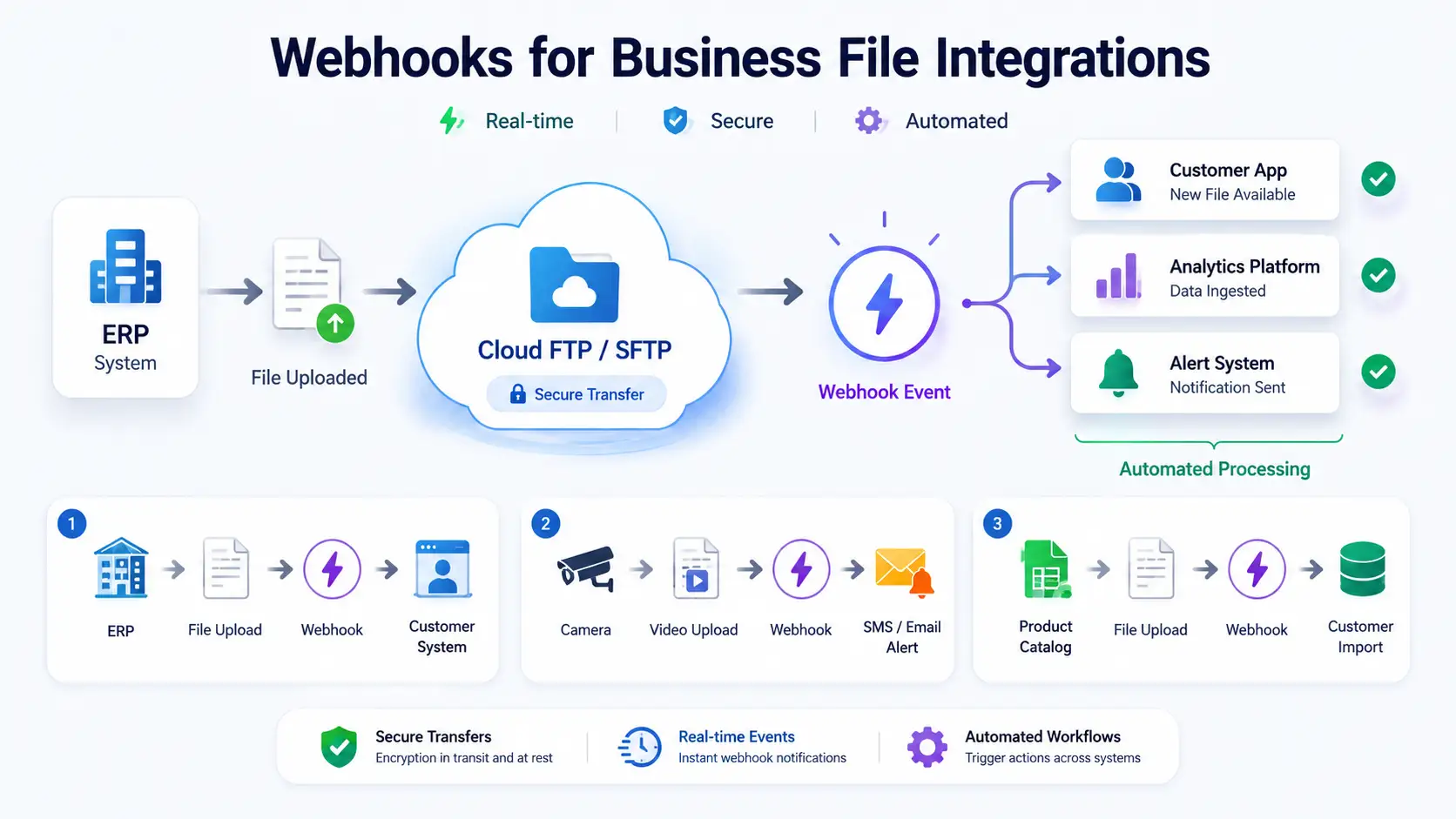
What is a webhook?
A webhook is simply an HTTP callback triggered by an event. Instead of repeatedly asking a system whether something happened, the system proactively notifies you when it does. In the context of file transfers, that means:
A file is uploaded
A file is renamed
A file is deleted
And your systems immediately receive a notification. The result is faster, simpler and more reliable automation.
Why webhooks matter for file integrations
Historically, file integrations relied heavily on polling. A receiving system would:
Check a folder every minute
Check again
Check again
Check again
Eventually a file appears and processing begins. While simple, this approach creates unnecessary complexity and delays. Webhooks allow systems to react instantly instead. Benefits include:
Real-time workflows
Less infrastructure
Reduced polling
Faster processing
Better observability
Simpler integrations
Business use case #1: ERP exports to business partners
Imagine a company exports invoices, inventory updates or sales reports from its ERP system every night. Traditionally, the receiving company would repeatedly check for new files. With webhooks, the workflow becomes event-driven.
ERP exports a file
File uploads to ftpGrid
ftpGrid sends a webhook
Partner system receives notification
Partner retrieves the file via REST API
ERP → ftpGrid → Webhook → Partner System → API Download
Benefits:
No polling
Faster processing
Reduced operational complexity
Better visibility
Business use case #2: Product catalog distribution
Many manufacturers and distributors publish daily product catalogs for customers. These files may contain:
Products
Pricing
Inventory
Technical specifications
Instead of customers checking for updates repeatedly, webhooks can notify them when a new catalog becomes available. Workflow:
Catalog generated
File uploaded
Webhook sent
Customer system imports updates
Product Catalog → ftpGrid → Webhook → Customer Import
Benefits:
Automated updates
Faster synchronization
Reduced support burden
Business use case #3: Surveillance and security workflows
Webhooks are particularly powerful when paired with surveillance systems. Imagine a camera uploads footage when motion is detected. A webhook can instantly notify external systems. Workflow:
Motion detected
Camera uploads video
Webhook triggered
Alerting platform sends SMS or email
Camera → ftpGrid → Webhook → Alert System
Benefits:
Real-time notifications
Automated response
Faster incident handling
Supported file events
ftpGrid webhooks are triggered by file-level events. Current events include:
file.uploadedfile.renamedfile.deleted
This allows integrations to react to the complete file lifecycle rather than just uploads.
Example webhook payload
When an event occurs, ftpGrid sends a JSON payload containing information about the file and event.
Example:
{
  "version": "1.0",
  "id": "evt_test_1776832799",
  "created_at": "2026-05-29T06:13:51.410000Z",
  "event_at": "2026-05-29T06:13:51.410000Z",
  "event": "file.uploaded",
  "protocol": "FTP",
  "test": true,
  "file_name": "test-file-123.txt",
  "file_path": "/test/test-file-123.txt",
  "file_size": 12345
}
This provides enough context for downstream systems to make intelligent decisions about processing.
Security first
Business integrations require trust. Every webhook request can be validated using cryptographic signatures and authentication headers. Supported security mechanisms include:
X-Ftpgrid-SignatureSHA-256 webhook signatures
Authorization headers
Endpoint validation
This allows receiving systems to verify that events genuinely originated from ftpGrid. For example, each webhook request includes a signature header:
X-Ftpgrid-Signature: sha256=abc123...The receiving system can calculate its own SHA-256 signature using the shared webhook secret (whsec_...) and compare the result to verify authenticity.
Event filtering
Not every file should trigger an integration. For that reason, webhooks support filtering rules that reduce noise and improve workflow precision. Available filters include:
Filename filters
Path filters
Minimum file size
Examples:
Only process CSV exports
Only trigger on
/exports/Ignore tiny test files
This allows businesses to build highly targeted automation workflows.
Beyond storage
One of the ideas behind ftpGrid has always been that file transfers should be more than storage. Files are often the starting point for larger business processes. By combining:
Secure file transfers
Webhooks
APIs
Automation
...file storage becomes an integration platform rather than a passive destination.
This philosophy is explored further here:
Why webhooks are better than polling
One of the biggest advantages of webhooks is that they eliminate the need for polling. Traditional integrations often work like this:
Check for new files
Wait
Check again
Wait
Check again
This creates unnecessary load, delays and complexity. With webhooks:
File arrives
Event fires immediately
Workflow starts
Benefits include:
Lower infrastructure costs
Faster response times
Less complexity
Better scalability
Simpler architectures
For many business integrations, this can significantly reduce operational overhead.
Final thoughts
Most file transfer solutions stop at storage. The file arrives and the workflow ends. But modern businesses increasingly need systems that react, automate and integrate. Webhooks provide that missing layer. Instead of asking whether something happened, your systems simply know when it does. And for many organizations, that turns file transfers from a manual process into a fully automated business workflow.
Interested in automation?