 ftpGrid menu
Replacing a Linux FTP Server With Managed Cloud FTP
Published 2026-08-27 04:26:07.145141 by Carsten Blum
Linux has long been a natural platform for FTP and SFTP services. A small virtual machine running vsftpd, ProFTPD, Pure-FTPd or OpenSSH can provide reliable file transfer for years, which is exactly why these servers often become deeply embedded in business integrations.
The challenge is not necessarily FTP itself. The organization still has to operate the Linux server, patch the operating system, maintain the transfer software, manage storage, monitor services, configure firewalls and preserve years of scripts and custom configuration. Replacing that infrastructure with managed Cloud FTP allows existing integrations to continue while transferring much of that operational responsibility to a managed platform.
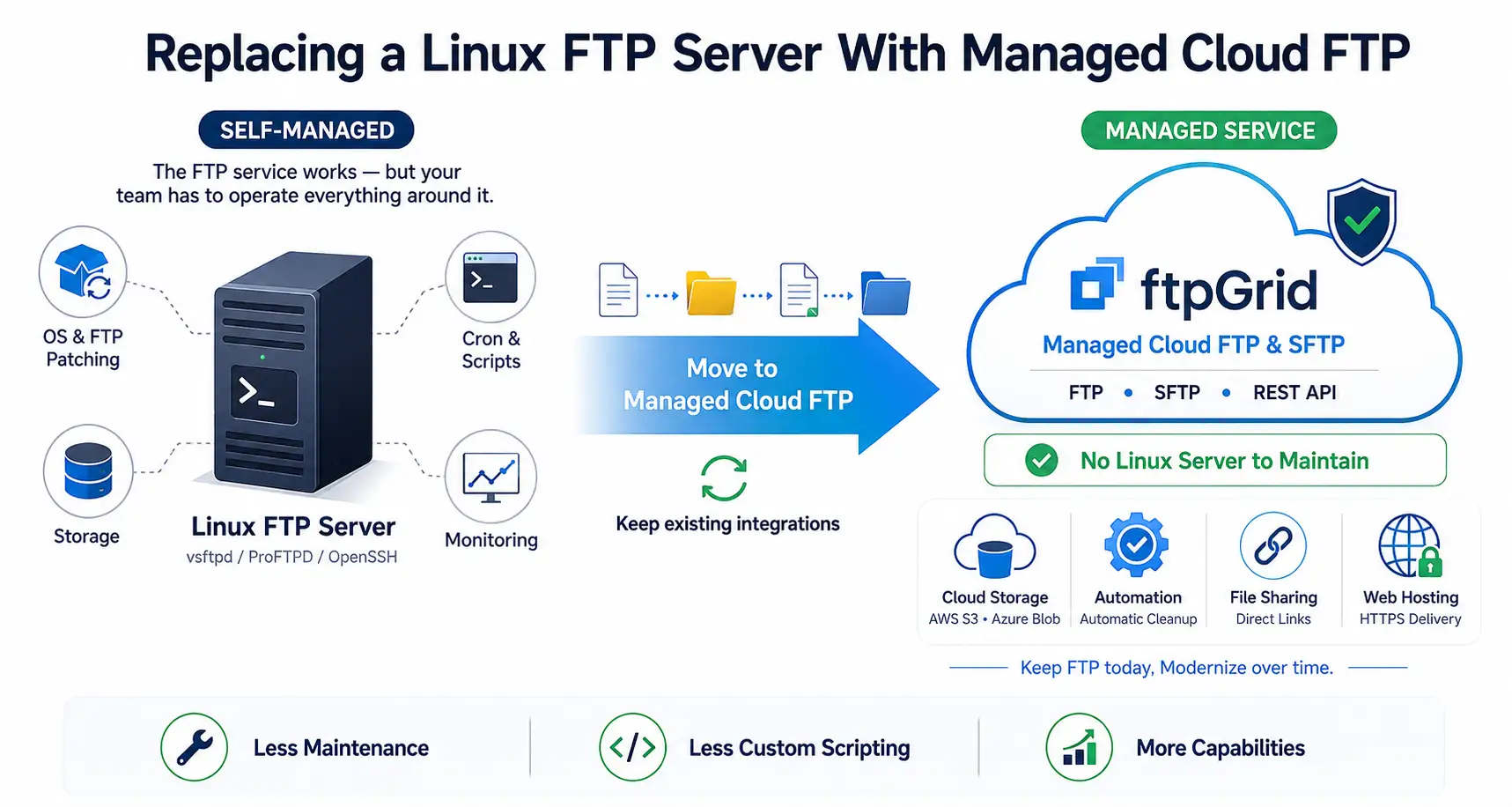 View large infographic (AI generated)
Why replace a Linux FTP server?
A Linux FTP server can be inexpensive to create but surprisingly expensive to own over its full lifecycle. What starts as a simple VM and a few configuration files can gradually become production infrastructure supporting ERP systems, suppliers, customers and automated data flows.
Managed FTP changes the operating model without necessarily changing the business integrations that depend on the service.
Eliminate dedicated FTP and SFTP virtual machines
Reduce Linux operating system maintenance
Remove FTP daemon patching and upgrades
Simplify storage management
Reduce firewall and network configuration
Remove custom monitoring requirements
Reduce dependency on internal Linux expertise
Preserve existing FTP and SFTP integrations
The objective is simple: keep the file transfer capability the business needs while removing infrastructure that provides little competitive value.
The hidden operational cost of a simple Linux FTP server
Linux FTP environments often look simple because much of their functionality is assembled from standard operating system components. The FTP daemon, SSH service, cron jobs, filesystem permissions, certificates, log rotation and monitoring may all be individually straightforward.
Together, however, they create a production service that somebody must understand, secure, monitor and maintain for as long as business applications depend on it.
Linux distribution lifecycle management
Security updates and package patching
vsftpd, ProFTPD or Pure-FTPd maintenance
OpenSSH configuration
TLS certificates for FTPS
User and SSH key administration
Filesystem permissions
Disk capacity management
Log rotation and retention
Firewall and passive port configuration
Monitoring and alerting
Backup and recovery
Cron jobs and maintenance scripts
Vulnerability management
The software may be open source, but operating a secure and reliable production service is not free.
Phase 1: Discover the existing Linux FTP environment
Before replacing the server, identify everything that depends on it. Linux servers are particularly prone to accumulating small scripts, cron jobs and configuration changes that are obvious to the administrator who created them but invisible to everyone else.
The discovery phase should therefore cover both the FTP configuration and the surrounding Linux environment.
FTP and SFTP accounts
Local Linux users
SSH public keys
FTP daemon configuration
OpenSSH configuration
Directory structures
Filesystem permissions
Chroot configurations
TLS certificates
Firewall rules
Passive FTP port ranges
IP restrictions
Cron jobs
Shell scripts
Mounted storage
ERP and application integrations
Suppliers and external partners
Transfer volumes and storage consumption
Each integration should also have an identified business owner so the project knows whether it is still required.
Phase 2: Identify custom scripts and automation
Linux makes automation easy, which is both an advantage and a migration risk. A mature FTP server may contain years of Bash scripts, cron jobs, rsync commands and maintenance utilities that have effectively become part of the business service.
These should be explicitly identified and classified rather than discovered after the server has been switched off.
Scheduled file transfers
Bash scripts
Cron jobs
Cleanup scripts
File processing jobs
Archive routines
rsync workflows
Monitoring scripts
Certificate renewal automation
User provisioning scripts
Backup jobs
Some automation may need to move with the service, while other scripts can disappear entirely because their functionality is provided by the managed platform.
Phase 3: Decide what should migrate
Replacing a Linux FTP server is an opportunity to simplify an environment that may have evolved organically over many years. There is little value in reproducing obsolete accounts, unused directories and unnecessary scripts in the new platform.
Each discovered workload should receive an explicit migration decision based on its current business requirement.
Migrate FTP unchanged
Migrate SFTP unchanged
Move FTP integrations to SFTP
Replace passwords with SSH keys
Replace custom workflows with REST API integrations
Move appropriate storage to AWS S3
Move appropriate storage to Azure Blob Storage
Replace cleanup scripts with managed automation
Retire unused accounts
Remove obsolete data
Decommission unnecessary scripts
This creates a cleaner target environment without turning the project into a complete application modernization exercise.
Phase 4: Design the managed cloud FTP environment
The new environment should be designed around current business requirements rather than around the filesystem and user structure of the Linux server being replaced. Existing paths may still need to be preserved for compatibility, but historical configuration should not automatically become the target architecture.
ftpGrid provides FTP and SFTP through a managed cloud platform, allowing both existing and modern file transfer requirements to coexist.
Define required FTP and SFTP accounts
Design folder structures
Separate applications and business partners
Define authentication standards
Configure SSH keys where required
Review access restrictions
Determine storage requirements
Define file retention requirements
Establish operational ownership
Document the target configuration
Organizations primarily using SSH-based transfers can use Cloud SFTP while retaining FTP where legacy applications still require it.
Phase 5: Choose the right migration technology
The source being a Linux FTP server does not mean FTP must be the only technology used during migration. Different workloads may benefit from different approaches depending on data volume, application architecture and the organization's cloud strategy.
ftpGrid supports FTP and SFTP alongside REST API, AWS S3 and Azure Blob Storage integrations, allowing the migration method to fit the workload rather than forcing every workload through the same path.
FTP and SFTP
For straightforward migrations, files can be transferred directly using standard FTP or SFTP tools. Existing Linux automation and command-line tooling can also make this an efficient approach for bulk or incremental transfers.
This is particularly suitable when the primary objective is infrastructure replacement rather than application redesign.
Familiar Linux tooling
Straightforward bulk migration
Easy to automate
Suitable for incremental synchronization
Minimal application changes
Preserve existing FTP and SFTP workflows
REST API
Some organizations want migration to become part of a controlled application workflow rather than a collection of shell scripts. The ftpGrid REST API provides an HTTPS-based interface that can be integrated into custom migration tools and business applications.
This also creates a modernization path for new integrations that no longer need to depend on traditional FTP clients.
Build custom migration software
Automate file operations over HTTPS
Integrate transfers into existing applications
Apply business-specific migration logic
Replace selected shell scripts
Create API-driven file workflows
See the REST API tutorial for an introduction to API-driven file integrations.
AWS S3
Organizations already operating in AWS can use Amazon S3 as part of the target architecture. ftpGrid connects traditional FTP and SFTP workflows with S3, allowing applications to retain familiar file transfer interfaces while storage moves toward cloud-native services.
This can separate storage modernization from application modernization and reduce the scope of the initial migration.
Integrate FTP workflows with AWS S3
Introduce cloud object storage
Preserve legacy application interfaces
Support hybrid migration patterns
Modernize storage independently
Build on an existing AWS strategy
Learn more about AWS S3 Sync.
Azure Blob Storage
Organizations following an Azure strategy can use the same approach with Azure Blob Storage. Existing FTP and SFTP clients remain operational while cloud object storage becomes part of the architecture.
This allows applications to be modernized individually instead of requiring every integration to adopt Azure-specific interfaces during the initial migration.
Integrate FTP with Azure Blob Storage
Support Azure cloud initiatives
Preserve FTP and SFTP compatibility
Reduce self-managed storage
Support gradual modernization
Separate application and storage migration
Learn more about Azure Blob storage sync.
Phase 6: Build the managed environment
Once the target architecture and migration technologies are agreed, the managed environment can be configured. The objective is to establish the production structure before moving critical integrations so migration becomes a repeatable process rather than a series of configuration changes.
Accounts, permissions and authentication should follow consistent standards across the new environment.
Create FTP and SFTP accounts
Configure directories
Apply permissions
Add SSH keys
Configure access restrictions
Prepare cloud storage integrations
Define retention policies
Document the configuration
Establish operational procedures
The environment should then be ready for data migration and pilot workloads.
Phase 7: Migrate existing files
The amount of historical data that actually needs to move should be decided before copying the entire Linux filesystem. Temporary files, old archives and abandoned integration directories may no longer provide business value.
For larger environments, an initial bulk migration followed by incremental synchronization can reduce the amount of data that must move during production cutover.
Identify required historical data
Remove unnecessary files
Perform an initial bulk transfer
Preserve required directory structures
Validate file counts and sizes
Run incremental synchronization
Perform final synchronization before cutover
Depending on the target architecture, migration can use FTP, SFTP, REST API or integrated cloud storage.
Phase 8: Run a representative pilot
A pilot migration validates more than connectivity. It tests whether the new environment can support the actual behavior of applications and business partners before high-risk workloads are moved.
Choose representative integrations that exercise authentication, directory permissions, automation and realistic file sizes.
Test FTP connections
Test SFTP and SSH keys
Validate automated transfers
Verify directories and permissions
Test large files
Validate external partner access
Measure transfer performance
Confirm operational visibility
Document migration issues
The migration process should be updated based on lessons learned before the broader rollout begins.
Phase 9: Test complete business processes
A successful sftp login is not a successful migration. Production integrations frequently rely on assumptions about filenames, directory structures, timing and downstream processing that are not visible from the FTP server configuration alone.
Testing should therefore validate the complete business workflow from file creation through transfer and final processing.
Validate authentication
Test uploads and downloads
Verify directory paths
Confirm scheduled jobs
Test external integrations
Validate downstream processing
Test expected error handling
Verify operational monitoring
Obtain business acceptance
The acceptance criteria should reflect business outcomes rather than simply protocol availability.
Phase 10: Cut over production integrations
Production workloads can be moved incrementally once the pilot and testing phases are complete. This reduces migration risk and makes troubleshooting easier because only a limited number of integrations change at any one time.
The project should maintain explicit rollback criteria and keep the old environment available only for the agreed transition period.
Define migration windows
Notify application owners and partners
Complete final synchronization
Change application endpoints
Update DNS where appropriate
Validate production transfers
Monitor authentication failures
Track migrated workloads
Maintain a temporary rollback option
Once all expected integrations have operated successfully, the project can begin decommissioning the Linux environment.
Phase 11: Decommission the Linux FTP server
The operational benefit is only realized when the legacy infrastructure actually disappears. Leaving the old server running indefinitely means patching, vulnerability management and monitoring responsibilities remain.
Decommissioning should include the surrounding Linux and network configuration, not merely stopping the FTP daemon.
Disable legacy FTP and SSH access
Remove obsolete user accounts
Archive required configuration
Remove firewall rules
Remove DNS references
Remove monitoring
Remove backup jobs
Remove vulnerability scanning scope
Release storage and compute resources
Update documentation
Retire the virtual machine
The business is then left with the file transfer capability without having to operate the underlying Linux platform.
Replace cron-based cleanup with managed automation
Linux administrators frequently use cron jobs and shell scripts to delete files after a defined period. These scripts work, but they become another piece of custom operational logic that must be maintained and understood.
ftpGrid provides automatic file cleanup rules so retention policies can be implemented as a platform capability rather than server-side scripting.
Automatically remove files after a defined period
Apply predictable retention policies
Reduce storage consumption
Eliminate custom cleanup scripts
Simplify operational ownership
Support file lifecycle policies
Learn more about Automation.
Share files without building another service
A traditional Linux FTP server is designed primarily for file transfer clients. When a business user needs to share a file directly with a customer or partner, organizations often introduce a separate application, web server or custom script.
ftpGrid can provide direct file links and hosted folders using files already available on the platform, expanding the service beyond traditional FTP access.
Create direct links to files
Share files without FTP credentials
Provide hosted folders
Protect hosted content with authentication
Support customer and partner distribution
Reduce duplicate file-sharing infrastructure
Learn more about File & web Hosting.
Deliver FTP-uploaded files over HTTPS
A common Linux pattern is to combine FTP storage with Nginx, Apache or another web server when files also need to be publicly or privately accessible over HTTPS. That introduces another service and another configuration to maintain.
Managed web hosting capabilities allow the same platform to receive files through FTP or SFTP and make them available through HTTPS where required.
Upload through FTP or SFTP
Deliver files over HTTPS
Publish application exports
Host product and marketing assets
Support automated downloads
Remove separate static web server infrastructure
This can simplify architectures where Linux previously provided both file transfer and web delivery.
Improve security governance and compliance
Moving to managed FTP does not automatically make an organization compliant with regulatory or contractual requirements. The business remains responsible for determining appropriate access controls, retention, data classification and supplier requirements.
A managed platform can, however, reduce the infrastructure scope the internal organization must operate and make file transfer services easier to standardize and govern.
Reduce internally managed infrastructure
Standardize file transfer services
Establish consistent access controls
Separate credentials between integrations
Use SSH key authentication where appropriate
Define file retention policies
Reduce unsupported legacy components
Establish clearer operational responsibility
Compliance requirements should always be evaluated against the specific data, industry, jurisdiction and contractual obligations involved.
Linux FTP server vs managed cloud FTP
Both approaches can transfer files reliably. The important difference is whether the organization wants to continue operating the infrastructure itself and whether the platform should provide capabilities beyond basic FTP and SFTP.
A managed platform shifts infrastructure responsibility while creating additional options for automation, APIs, cloud storage and file distribution.
Capability | Self-Hosted Linux FTP | Managed ftpGrid |
|---|---|---|
FTP | Yes | Yes |
SFTP | Yes, typically OpenSSH | Yes |
Linux maintenance | Internal responsibility | Managed |
FTP software patching | Internal responsibility | Managed |
Storage management | Internal responsibility | Managed |
Monitoring | Internal/custom | Managed platform |
Cleanup and retention | Often cron/scripts | Built in |
REST API | Custom development | Available |
AWS S3 integration | Custom tooling | Available |
Azure Blob integration | Custom tooling | Available |
Direct file sharing | Custom/separate solution | Available |
Web-hosted files | Apache/Nginx/custom | Available |
Infrastructure lifecycle | Internal responsibility | Managed |
The value of managed FTP is therefore not that Linux is incapable of providing these functions. Linux can do almost anything if enough engineering time is applied to it. The question is whether operating custom file transfer infrastructure is where the organization wants to spend that engineering time.
Managed FTP versus moving Linux FTP to a cloud VM
It is possible to migrate an existing Linux FTP server directly into AWS, Azure or another infrastructure-as-a-service environment. That removes the physical server or on-premise VM, but it does not remove responsibility for the FTP service.
The organization still operates Linux, the FTP daemon, OpenSSH, certificates, firewall configuration, storage, monitoring and upgrades. The server has moved to the cloud, but the operating model has not changed.
Cloud VM still requires operating system patching
FTP software still requires maintenance
Storage still requires capacity management
Firewall and passive FTP configuration remain
Monitoring remains an internal responsibility
Security hardening remains an internal responsibility
Future Linux upgrades remain your project
Managed cloud FTP removes the server from the equation instead of simply relocating it.
From Linux server to managed file integration platform
A Linux FTP replacement can begin conservatively. Existing FTP and SFTP applications continue using the protocols they already understand while the underlying server and operational responsibilities disappear.
Once the migration is complete, REST APIs, AWS S3, Azure Blob Storage, automated retention and HTTPS file delivery provide options for modernizing individual workflows when there is a genuine business reason to do so.
Preserve existing FTP integrations
Preserve existing SFTP integrations
Remove Linux server operations
Introduce REST APIs for new applications
Connect workflows with AWS and Azure
Replace maintenance scripts with platform automation
Support direct file distribution
Modernize incrementally
The result is not simply FTP running somewhere else in the cloud. It is a transition from a self-managed Linux server to a managed file transfer and integration platform.
Replace your Linux FTP server with ftpGrid
If your organization still needs FTP or SFTP but no longer wants to maintain Linux infrastructure solely to provide file transfer services, ftpGrid provides a managed alternative. Existing applications can retain familiar protocols while the infrastructure becomes a managed cloud service.
The migration can start by retiring a Linux FTP server and reducing operational overhead, while REST APIs, AWS S3, Azure Blob Storage, automation and web-based file delivery provide a foundation for future file integration requirements.