 ftpGrid menu
Secure cloud FTP storage: how to protect your file transfers
Published 2026-05-07 04:03:05.891431 by Carsten Blum
File transfers are still a critical part of modern infrastructure. ERP exports, backups, partner integrations, media uploads — many systems still rely on FTP-based workflows every single day.
But security expectations have changed dramatically. Today, it’s not enough for file transfers to simply work.
They also need to be:
Encrypted
Auditable
Access controlled
Operationally secure
In this guide, we’ll look at how modern cloud FTP solutions improve security — and why traditional setups often become risky over time.
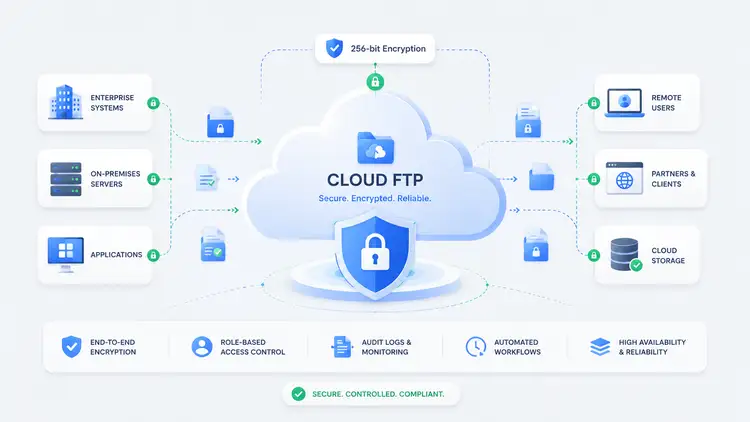
Why FTP security matters
File transfers often contain sensitive information:
Financial exports
Customer data
Internal reports
Media files
Backup archives
And because FTP workflows are frequently automated, security problems can go unnoticed for a long time.
The issue usually isn’t the transfer itself. It’s the surrounding infrastructure.
The problem with traditional FTP setups
A typical self-hosted FTP setup often looks like this:
Linux server
FTP software installed manually
Local storage attached
Users managed manually
At first, this works fine.
But over time, teams often struggle with:
Outdated software
Weak password policies
Missing audit logs
Manual permission handling
Limited visibility into activity
→ https://ftpgrid.com/tutorials/self-hosted-ftp-scaling-problems/
Use secure protocols: SFTP and FTPS
One of the most important improvements is using encrypted protocols.
SFTP
SFTP encrypts both authentication and data transfer.
This prevents:
Credential exposure
Traffic interception
Unencrypted file transfers
FTPS
FTPS adds TLS/SSL encryption on top of traditional FTP workflows.
This is often useful when compatibility with existing systems is required.
Access control matters
A secure file transfer setup should make it easy to:
Create isolated users
Restrict directory access
Control permissions
Remove unused accounts quickly
Without proper access control, FTP environments often become difficult to manage securely over time.
A managed cloud FTP service simplifies this significantly.
Security is also operational
Security isn’t only about encryption. It’s also about operational reliability.
For example:
Is storage redundant?
Are uploads monitored?
Can suspicious activity be detected?
Is scaling handled safely?
These operational concerns become increasingly important as systems grow.
Using scalable cloud FTP storage reduces many of these risks automatically.
Visibility and auditability
One of the biggest weaknesses in older FTP setups is limited visibility.
Teams often lack:
Centralized logging
Upload history
Event visibility
Integration monitoring
Modern cloud FTP platforms increasingly solve this with:
Audit logs
Webhooks
API access
Event-driven workflows
This makes integrations both easier to monitor and easier to secure.
Real-world example: secure ERP integrations
Let’s say an ERP system exports invoice files to external customers or auditors.
You don’t want to:
Give direct ERP access
Send sensitive files over email
Rely on manual uploads
Instead:
ERP exports files automatically
Files are uploaded securely via SFTP
Access is restricted per customer
Webhooks notify external systems
ERP → Secure Cloud FTP → Controlled access → External system
This creates a much more secure and auditable workflow.
Cloud FTP vs hyperscaler complexity
Many companies eventually try to replace FTP workflows using hyperscaler tooling.
But in practice, that often introduces:
More operational complexity
More configuration overhead
More moving parts
For many file-based workflows, a focused cloud FTP platform provides a simpler and more transparent security model.
Security and automation
Modern security also means reducing manual processes.
For example:
Automatic user provisioning
Event-driven alerts
API-controlled workflows
Secure integrations with S3 and cloud systems
This is where cloud FTP starts becoming part of a broader infrastructure layer — not just a file server.
Final thoughts
Secure file transfers are no longer optional. But security also shouldn’t require maintaining fragile infrastructure or building custom tooling around outdated systems.
Modern cloud FTP platforms combine:
Secure protocols
Managed infrastructure
Operational visibility
Simpler workflows
…to make file-based integrations both safer and easier to operate.
Explore cloud FTP to build secure and scalable file transfer workflows.