Howto: Using ftpGrid as an FTP to AWS S3 Proxy
Published {$created} by Carsten Blum
You’ve built your infrastructure on AWS. You’re using AWS S3 for cloud storage. Everything is modern, scalable, and clean. You love it.
The problem is:
You need to upload files using FTP or SFTP.

Maybe it's:
a legacy system
a security camera
an IoT device
a third-party integration
or just an old script that won’t change
And suddenly, your nice S3 setup doesn’t help. Because S3 doesn’t speak FTP.
The Problem
AWS S3 is object storage. FTP and SFTP are file transfer protocols.
They don’t natively connect.
So people usually end up building:
custom middleware
cron jobs
sync scripts
temporary servers
It works — but it’s messy.
The Solution: ftpGrid as a Proxy
With ftpGrid, you can create a simple pipeline:
Data provider → FTP/SFTP → ftpGrid → AWS S3
ftpGrid acts as a managed FTP to S3 proxy.
You upload files using FTP or SFTP — and ftpGrid automatically syncs them to your S3 bucket.
No scripts.No infrastructure.No glue code.
What You Get
Using ftpGrid as an FTP → S3 proxy gives you:
FTP, SFTP, FTPS, SCP endpoints
automatic sync to AWS S3
optional mirroring (delete sync)
secure credentials handling
no server setup
fast time to production
Step-by-Step: FTP to AWS S3 Using ftpGrid
Step 1 – Create Your ftpGrid Account if you don't have one
Sign up here: https://app.ftpgrid.com/auth/signup/
Or follow our simple onboarding guide.
Step 2 – Create AWS S3 Integration
Go to:
Cloud Sync → Create sync config
Select:
AWS S3 or S3 compatible
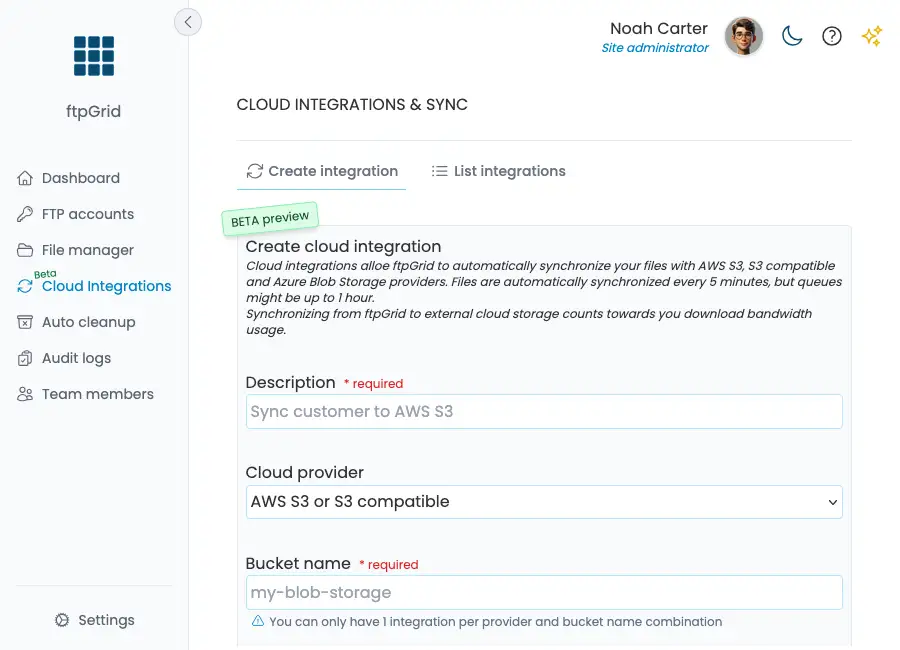
Step 3 – Configure the S3 Bucket
Enter the name of your bucket. Example:
my-ftpgrid-backups
You may also specify a remote path inside the bucket. Example:
customer-exports/
If left blank, ftpGrid will sync with the root of the bucket.
Step 4 – Choose the ftpGrid Path
Define which directory inside ftpGrid should be synchronized. Example:
customer/abc
The integration will include all subdirectories.
Common examples:
/uploads/cameras
/uploads/backups
/uploads/exports
Step 5 – Choose Sync Mode
Select how files should be synchronized.
Options include:
Copy ftpGrid → S3 (Copies files from ftpGrid to bucket, doesn't delete in bucket)
Copy S3 → ftpGrid (Copies files from bucket to ftpGrid, doesn't delete on ftpGrid)
Mirror ftpGrid → S3 (Synchronizes files from ftpGrid to bucket, deletes files in bucket that are not on ftpGrid - creates an exact mirror)
Mirror S3 → ftpGrid (Synchronizes files from bucket to ftpGrid, deletes files on ftpGrid that are not in bucket - creates an exact mirror)
Most users choose:
Copy ftpGrid → external cloud
This ensures files uploaded via FTP are automatically stored in S3.
Step 6 – Enter AWS Credentials
Enter your AWS credentials.
Access Key example:
ABC123...
Secret Key example:
123ABC...
Region example:
eu-west-1
If you are using an S3 compatible provider, you must also enter the endpoint. Be careful to use the proper endpoint URLwithout bucket name.
Example:
https://s3.eu-west-1.io.cloud.ovh.net/
Step 7 – Test the Integration
Click:
Test integration
ftpGrid will verify:
credentials
bucket access
connectivity
Please note: ftpGrid performs the test by creating a file on the remote storage, and must have both read and write access to the bucket path.
If successful, enable the integration.
How the Pipeline Works
Once everything is configured:
Upload via FTP →
  Stored in ftpGrid →
    Automatically synced →
      Stored in AWS S3
Typical sync interval:
~5 minutes
Real-World Use Cases
Security Cameras
Many cameras only support FTP uploads.
With ftpGrid:
camera uploads → ftpGrid
ftpGrid syncs → S3
IoT Devices
Devices send logs via FTP.
You get:
simple ingestion
cloud-native storage
When to Use Mirroring
If you want S3 to match ftpGrid exactly:
Mirror ftpGrid → S3
This means:
deleted files are removed from S3
both systems stay identical
Why Not Just Use Scripts?
You could build:
cron + rsync + aws cli
But then you need to maintain:
servers
credentials
error handling
retries
monitoring
ftpGrid removes all of that.
Security Considerations
ftpGrid ensures:
encrypted transfers
secure credential storage (AES-256)
controlled access
EU-based hosting
You stay compliant while integrating legacy systems.
Final Thoughts
Modern infrastructure doesn’t always match real-world systems. FTP is still everywhere. AWS S3 is everywhere.
ftpGrid connects the two.
Instead of replacing your systems, you can simply bridge them.